


⚠ Important: -The default installation path changed from version 9.25.0 of C:\Program Files (x86)\Aranda\Conserver to C:\Program Files\Aranda\Conserver. This change is in response to standardization towards 64-bit architectures, which allows for better use of memory and system resources. Therefore, review and update the exclusions configured in antivirus and other security solutions, so that they take into account the new default installation path or the custom path that is defined during deployment. Otherwise, the normal operation of the application could be affected.
⚐ Note: Installation of the Conserver requires that the server has version 4.8 of the .NET framework or later.
1. Stop the Aranda Conserver V9 service.
2. Uninstall the Conserver Service program from the control panel.
3. Delete the record from the following folder:
- Folder
“%Program Files (x86)%\Aranda\Conserver”.
⚐ Note: Do not delete the contents of the Conserver repository.
4. Run the installer Aranda.Conserver.Installer.exe. Do not upload the service until configuring the .config of the conserver folder. See Installation, Server, and Configuration..
5. Start the Aranda Conserver V9 service.
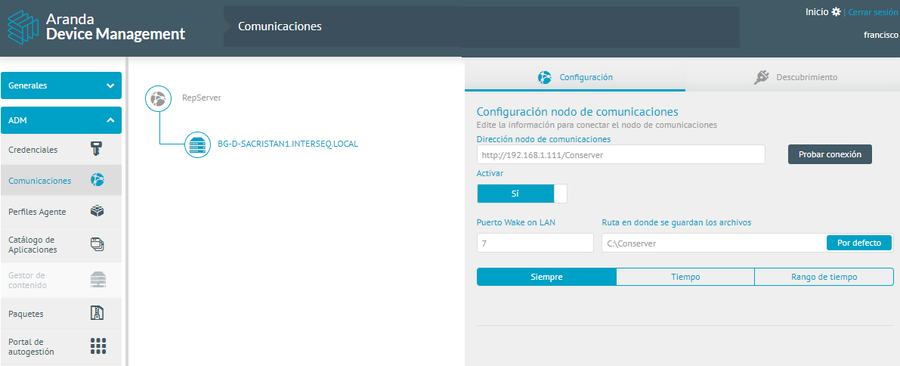
6. To verify the successful connection of the conserver, log in to the ADM Management Console, in the ADM Configuration from the main menu, select the Communications . In the Information View, in the Communications Tree, click on the Repserver node and select Keep. In the detail view on the Configuration Click the Test Connection
⚐ Note:
- From Conserver version 9.25.0, after 24 hours after the ADM console update, the Conserver will automatically attempt to update to the latest version released for the ADM console version.