


⚠ Important: The address IP or the name DNS server where the ConServer it must remain fixed.
If the IP or the DNS change after installation, agents they will lose connectivity, being necessary Reinstall or reconfigure them to re-establish communication.
1. During Conserver installation, if you keep the default path, the files will be saved in C:\Program Files\Aranda\Conserver. If you select a different path, the files will be in the location you define. Then, configure the file appsettings.json in the following way to communicate with the Repserver:
| Configuration path | Description |
|---|---|
Serilog:MinimumLevel |
Used to set the minimum level of event logging for the Serilog log library. |
Serilog:WriteTo:0:Name |
Used to specify the first log target to be used for Serilog. The value “File” indicates that log events will be written to a file. |
Serilog:WriteTo:0:Args:path |
It is used to specify the path and name of the file where log events will be written. |
Serilog:WriteTo:0:Args:shared |
It is used to specify whether the log file should be shared by multiple processes or not. |
Serilog:WriteTo:0:Args:rollingInterval |
Used to specify the time interval at which new log files are created. |
Logging:LogLevel:Default |
It is used to set the default logging level for the Microsoft logging library. |
Services:ServerAddress |
Address where the Repserver is located. |
Services:CertificateSubject |
The name of the certificate that Conserver will use. |
Services:EnableProxy |
If you use Proxy, the enableProxy tag is enabled with a value of “true”. |
Services:ProxyAddress |
Proxy address. |
Services:ProxyUser |
Proxy User. |
Services:ProxyPassword |
Proxy password. |
Services:PrivateIp |
Identifier on the internal network of the Conserver, the IP must go. |
Services:PublicIp |
Identifier of the network of the Conserver from the outside, the IP must go. (If it is not required, the same private address is used). |
Services:MqttServerPort |
MQTT Communication port, by default is parameterized to “1884”. |
Services:MqttIp |
MQTT identifier on the internal network, the IP must go. |
Services:PublicServerPort |
Conserver’s public network communication port, by default “80” is parameterized. |
Services:PrivateServerPort |
Conserver private network communication port, by default “80” is parameterized. |
Services:MaxDistributionSleepMsPerThread |
- |
Services:MaxDistributionThreads |
These last two tags are used for the internal functioning of the system, they must be modified. |
Services:EnableSecurityPrivateIp |
Enables security validation for connections made using private IP addresses. |
Services:EnableSecurityPublicIp |
Enables security validation for connections made using public IP addresses. |
Services:SecondsPingRemoteServer |
Interval, in seconds, to check the availability of the remote server. |
{
  "Serilog": {
    "Using": [ "Serilog.Sinks.File" ],
    "MinimumLevel": "Debug",
    "WriteTo": [
      {
        "Name": "File",
        "Args": {
          "path": "Logs\\Conserver-%COMPUTERNAME%.log",
          "shared": true,
          "rollingInterval": "Day",
          "retainedFileCountLimit": 7,
          "outputTemplate": "{Timestamp:yyyy-MM-dd HH:mm:ss.fff zzz} [{Level:u3}] {Message:lj} {Properties:j}{NewLine}{Exception}"
        }
      }
    ]
  },
  "Logging": {
    "LogLevel": {
      "Default": "Information",
      "Microsoft": "Warning",
      "Microsoft.Hosting.Lifetime": "Warning",
      "Quartz": "Warning",
      "System.Net.Http.HttpClient": "Warning"
    }
  },
  "Services": {
    "ServerAddress": "",
    "CertificateSubject": "",
    "EnableProxy": false,
    "ProxyAddress": "",
    "ProxyUser": "",
    "ProxyPassword": "",
    "PrivateIp": "",
    "PublicIp": "",
    "MqttServerPort": 1884,
    "MqttIp": "",
    "PrivateServerPort": 80,
    "PublicServerPort": 80,
    "MaxDistributionSleepMsPerThread": 8,
    "MaxDistributionThreads": 4,
    "EnableSecurityPrivateIp": false,
    "EnableSecurityPublicIp": false,
    "SecondsPingRemoteServer": 60
  }
}
2. Start the service Aranda Conserver V9, to allow communication with the Repserver.

—
Configuring the Server to receive requests over HTTPS
To configure the Server to receive requests over HTTPS, HTTPS must be enabled in the IIS with the proper certificate.
Important to secure any additional hostnames using SNI.
IP address: select “All unassigned”.
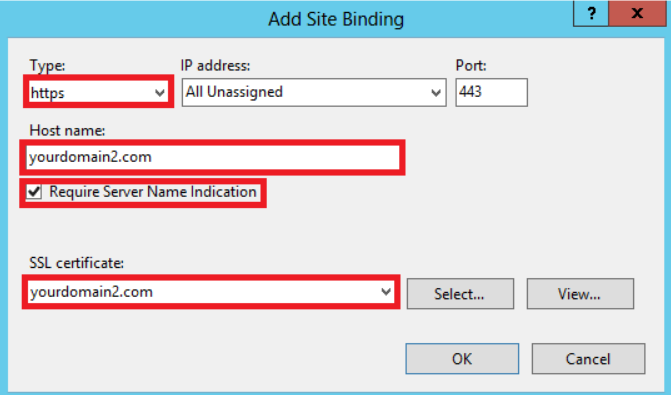
IIS environment with SSL certificate
When your environment already has IIS and an SSL certificate installed, configure the file settings appsettings.json as follows:
| Parameter | Value | Description |
|---|---|---|
| serverAddress | <https://<repserver> |
Address of the Repserver. |
| CertificateSubject | <nombre del certificado> |
The name of the SSL certificate that Conserver will use. |
| enableProxy | false |
Enabled only if Proxy is used in the environment. |
| privateIp | <hostname> |
Hostname or private IP of the Conserver. |
| publicIp | <hostname> |
Hostname or public IP of the Conserver. |
| mqttServerPort | 1884 |
MQTT communication port (default 1884). |
| mqttIp | <hostname> |
Name of the host or IP where MQTT is located. |
| privateServerPort | 443 |
Secure communication port on private network (HTTPS). |
| publicServerPort | 443 |
Secure communication port on the public network (HTTPS). |
| maxDistributionSleepMsPerThread | 8 |
Internal system parameter. |
| maxDistributionThreads | 4 |
Internal system parameter. |
| EnableSecurityPrivateIp | true |
Enables security validation for private network connections. |
| EnableSecurityPublicIp | true |
Enables security validation for public network connections. |
| SecondsPingRemoteServer | 60 |
Interval in seconds to check remote server availability. |
JSON configuration example:
{
  "Serilog": {
    "Using": [ "Serilog.Sinks.File" ],
    "MinimumLevel": "Information",
    "WriteTo": [
      {
        "Name": "File",
        "Args": {
          "path": "Logs\\Conserver-%COMPUTERNAME%.log",
          "shared": true,
          "rollingInterval": "Day",
          "retainedFileCountLimit": 7,
          "outputTemplate": "{Timestamp:yyyy-MM-dd HH:mm:ss.fff zzz} [{Level:u3}] {Message:lj} {Properties:j}{NewLine}{Exception}"
        }
      }
    ]
  },
  "Logging": {
    "LogLevel": {
      "Default": "Information",
      "Microsoft": "Warning",
      "Microsoft.Hosting.Lifetime": "Warning",
      "Quartz": "Warning",
      "System.Net.Http.HttpClient": "Warning"
    }
  },
  "Services": {
    "ServerAddress": "<https://<repserver>",
    "CertificateSubject": "",
    "EnableProxy": false,
    "ProxyAddress": "",
    "ProxyUser": "",
    "ProxyPassword": "",
    "PrivateIp": "<hostnamePrivate>",
    "PublicIp": "<hostnamePublic>",
    "MqttServerPort": 1884,
    "MqttIp": "<hostnameMQTT>",
    "PrivateServerPort": 443,
    "PublicServerPort": 443,
    "MaxDistributionSleepMsPerThread": 8,
    "MaxDistributionThreads": 4,
    "EnableSecurityPrivateIp": true,
    "EnableSecurityPublicIp": true,
    "SecondsPingRemoteServer": 60
  }
}
⚠ Important: HTTPS traffic will be handled entirely through IIS. A valid SSL certificate must be associated with the Conserver website in IIS, and the ports PrivateServerPort and PublicServerPort should be set to
443to establish secure communication. The parameters EnableSecurityPrivateIp and EnableSecurityPublicIp must be set totrueto ensure security validation. If IIS is already using port 443 and connectivity testing is required, it may need to be temporarily released according to the procedure defined by the organization.
Environment without IIS and with certificate
When the environment does not have IIS installed, the Conserver will directly handle secure communication. In this case, keep the configuration as described in the initial section of this document, using the default ports and parameters:
- PrivateServerPort:
443(or the port configured for the private network). - PublicServerPort:
443(or the port configured for the public network). - EnableSecurityPrivateIp:
true(adjustment according to the organization’s security policy). - EnableSecurityPublicIp:
true(adjustment according to the organization’s security policy).
Example of JSON configuration for non-IIS and certified environment:
{
  "Serilog": {
    "Using": [ "Serilog.Sinks.File" ],
    "MinimumLevel": "Information",
    "WriteTo": [
      {
        "Name": "File",
        "Args": {
          "path": "Logs\\Conserver-%COMPUTERNAME%.log",
          "shared": true,
          "rollingInterval": "Day",
          "retainedFileCountLimit": 7,
          "outputTemplate": "{Timestamp:yyyy-MM-dd HH:mm:ss.fff zzz} [{Level:u3}] {Message:lj} {Properties:j}{NewLine}{Exception}"
        }
      }
    ]
  },
  "Logging": {
    "LogLevel": {
      "Default": "Information",
      "Microsoft": "Warning",
      "Microsoft.Hosting.Lifetime": "Warning",
      "Quartz": "Warning",
      "System.Net.Http.HttpClient": "Warning"
    }
  },
  "Services": {
    "ServerAddress": "",
    "CertificateSubject": "Nombre_certificado",
    "EnableProxy": false,
    "ProxyAddress": "",
    "ProxyUser": "",
    "ProxyPassword": "",
    "PrivateIp": "",
    "PublicIp": "",
    "MqttServerPort": 1884,
    "MqttIp": "",
    "PrivateServerPort": 443,
    "PublicServerPort": 443,
    "MaxDistributionSleepMsPerThread": 8,
    "MaxDistributionThreads": 4,
    "EnableSecurityPrivateIp": true,
    "EnableSecurityPublicIp": true,
    "SecondsPingRemoteServer": 60
  }
}