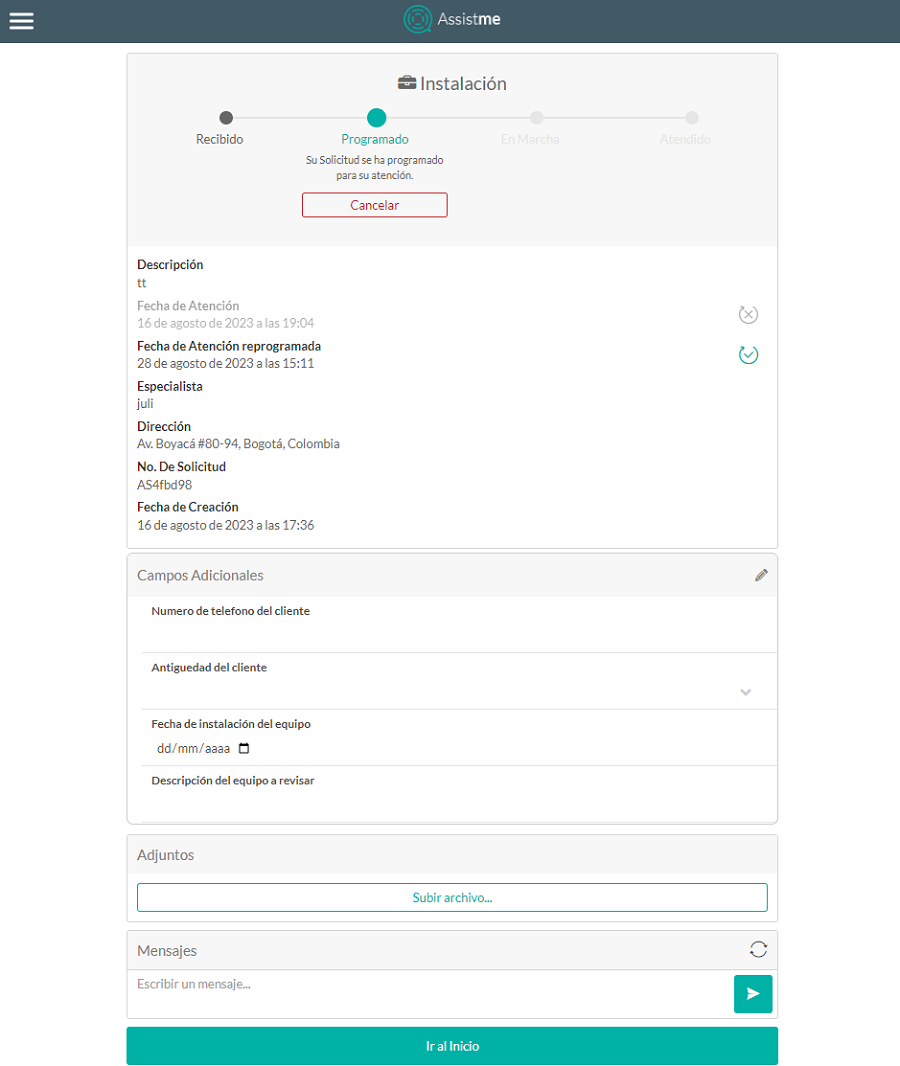
This status indicates that the work order was assigned to a provider and a specialist for care, when an order is in Scheduled The following information is displayed:
- Basic Info: Service, description, date of Attention, date of rescheduled care, specialist, address, Request No. and date of Creation.
- Additional fields: They are displayed when the Configuring Additional Fields for Work Orders in the web console.
When you select the edit Fields with update permission are enabled, after making the additional field information settings for the request, select the save
  where the following confirmation message is displayed Updated Information.
 - Attachments: Allows you to upload a file to the request if necessary.
When you select the Upload file the Windows Explorer window is displayed where the file to be imported in the request must be searched and selected. - Messages: It will be possible to send messages (public notes) from the request to dispatchers, monitors or specialists.
These messages will be displayed at the bottom of the request showing the interaction between the dispatcher, monitor or specialist and the end user, when typing the message select the Send so that the comment is associated with the request.
⚐ Note: While the user is within the order, click the refresh icon to refresh the received messages.
- 2. The Go to top allows you to go back to order creation.