The tab Help Allows you to view the general information of (KB), including support documents, FAQs, common issues, and user guides.
1. In the ASMS mobile console, on the My Portal taskbar, select the Help.
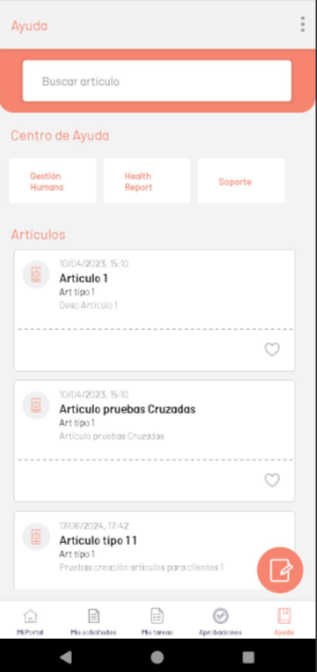
This option displays the available help articles and options for accessing this information:
| Options | Description |
|---|---|
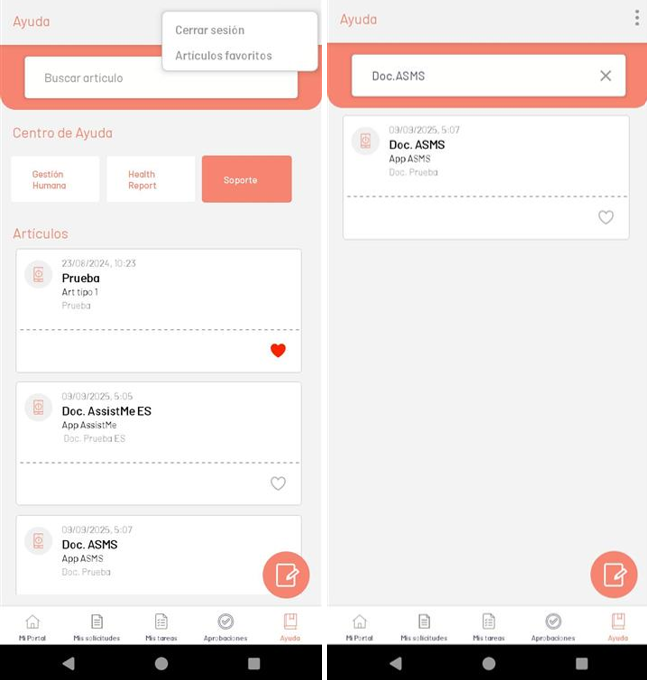
| 1. Floating menu | Displays a floating menu with options such as Log Out and Favorite Items. |
| 2. Search for items | Allows you to search for articles that contain information related to the text entered. |
| 3. Help Center | Displays the projects to which the logged-in user is associated. When you select a project, the list of available items is filtered. |
| 4. Articles | Displays a list of the items configured in the different projects. When you select an item, the item’s detail is expanded. |
⚐ Note: By default, the list of Articles displays the contents of the first project visible in the Help Center. To view articles from other projects, select the desired project; The app will display only the articles associated with the selected project.
When searching or filtering by item category doesn’t return results, a watermark is displayed informing you that there are no matches.
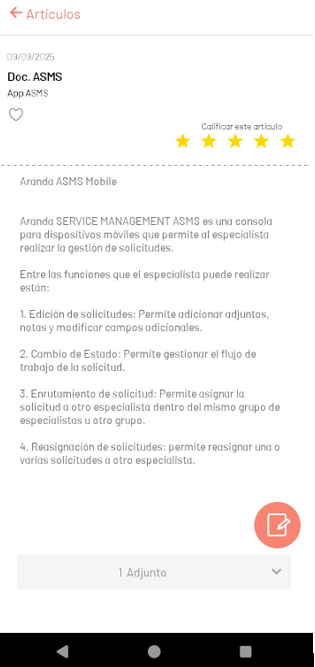
2. After selecting a help article, the user will be able to view the item’s detail.
| Options | Description |
|---|---|
| 1. Item Information | Displays the information associated with the article: Publication date, name, category, and favorite status. |
| 2. Total Rating | Displays the item’s rating. If the user hasn’t rated the item yet, tapping this section opens a pop-up window to grade. |
| 3. Article Content | Displays the information contained in the article. |
| 4. Attachment | Displays the attachments to the article. You can download them by clicking on the file and then clicking Download. |
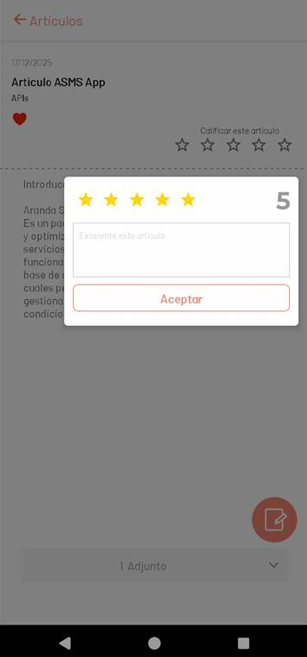
By selecting the rating option, you can rate the article by marking the stars and entering a mandatory comment. Finally, submit the grade.