


The action Invoke Webhook, available when you configure a rule, allows you to automatically send the information of an ASEC event to an external service using a configurable HTTP request.
Configure the Webhook
1. In the rule edit window, within the Select Actions, select the action Invoke Webhook and click on it to open its settings.
2. In the Tags, select the field where you want to insert them (URL, Parameters, Headers, or Body) and click on the corresponding tag to add it. The available tags depend on the event configured in the rule; see the full list at Manage Rules.
3. Select the HTTP method (GET, POST, PUT, PATCH, COPY, HEAD, OPTIONS, MERGE or DELETE) and enter the URL of the service that will be invoked when the webhook is executed. Inserted tags are represented by double curly brackets, for example ``.
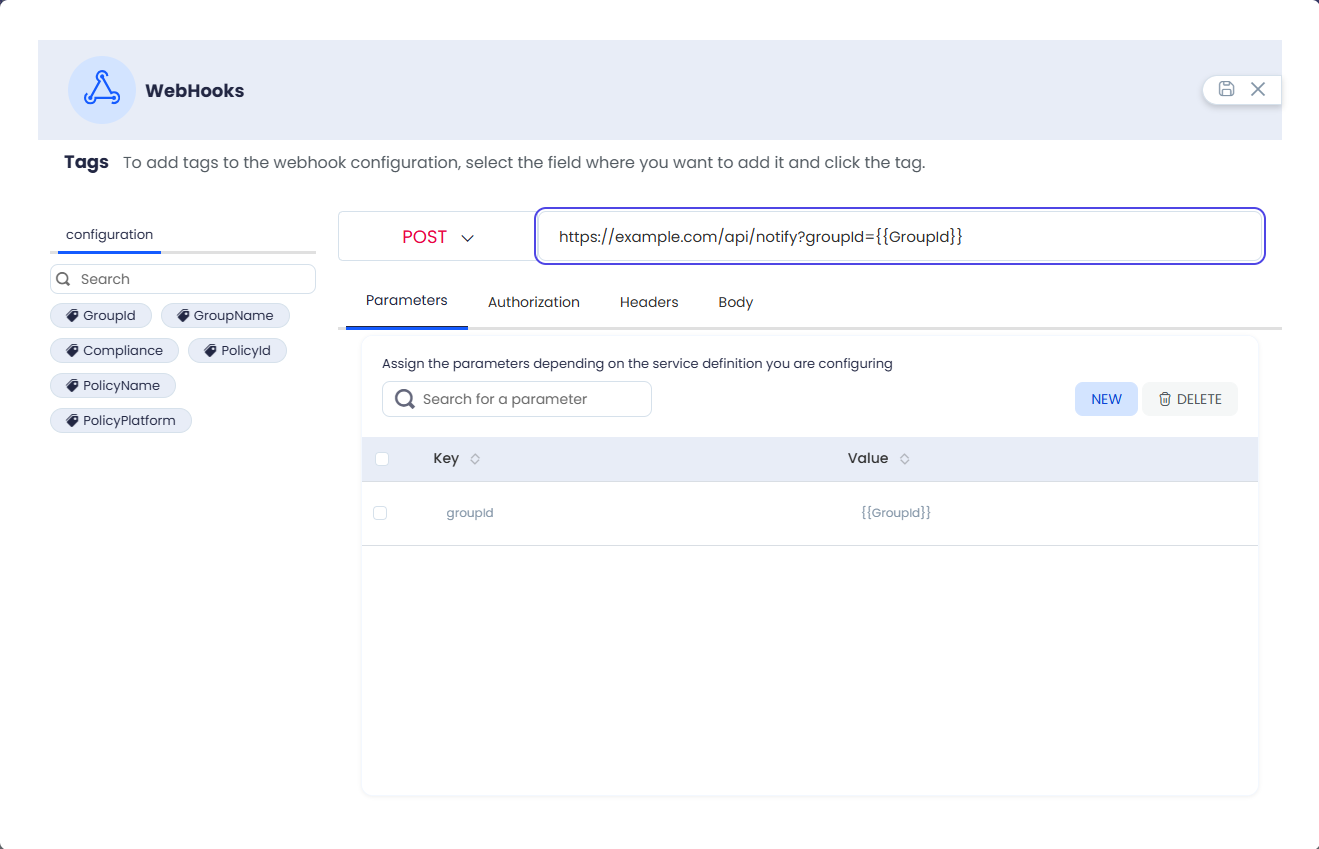
⚐ Note: If a query parameter is added directly to the URL (
?clave=), the system automatically detects it and includes it in the list in the Parameters.
Assign Parameters
4. On the Parameters, click the New and enter a Key and a Value. The value can include a tag, which will be replaced with the event information when the webhook is executed.
Assign Authorization
5. On the Authorization, select the type of authorization required by the service: No authorization, Basic (username and password) or Bearer (access token).
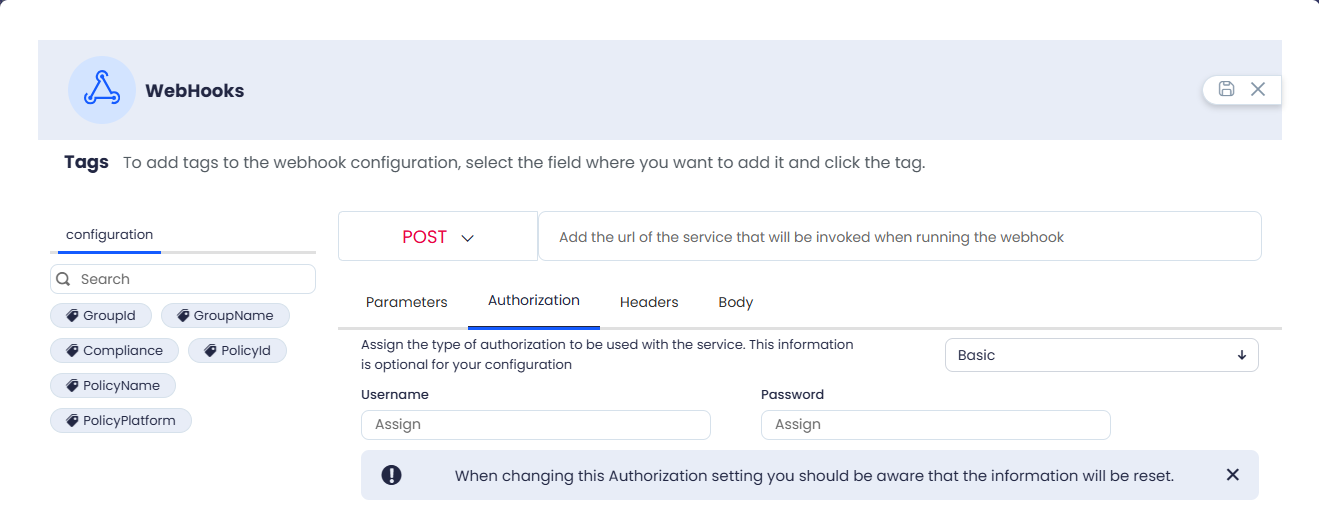
⚐ Note: Changing the authorization type resets the information previously configured in this tab.
Assign Headers
6. On the Headlines, click the New and enter a Key and a Value for each HTTP header that needs to be sent with the request.
Assign Body
7. On the Body, select the request content type (None, text/plain, application/json, text/html or application/xml) and enter the content to be sent to the service.
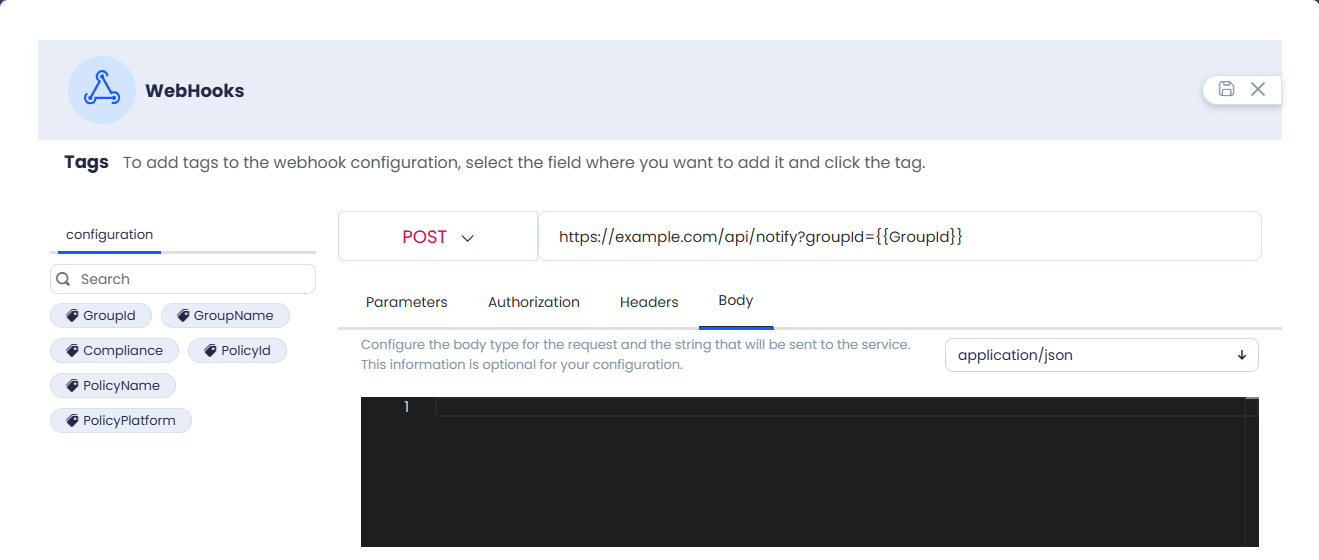
8. Click the Save to confirm the webhook configuration.
Description of the Labels
DEFINICION: ❯ Cambio en el nivel del grupo de cumplimiento
| Technical field | Description |
|---|---|
| GroupId | Unique identifier of the group. |
| GroupName | Device group name. |
| Compliance | Compliance status with the evaluated policy. |
| PolicyId | Unique internal identifier for the policy. |
| PolicyName | Readable name of the configured policy. |
| PolicyPlatform | Objective operating system of the policy. |
DEFINICION: ❯ Nueva vulnerabilidad detectada
| Technical field | Description |
|---|---|
| CveId | Unique internal identifier of the vulnerability registry. |
| Cve | Public CVE code of the vulnerability. |
| Severity | General risk level: Low, Medium, High or Critical. |
| Published | Date of initial publication of the vulnerability. |
| Cwe | Type of software weakness according to CWE standard. |
| Description | Summary of the security issue and its potential impact. |
| DevicesCount | Total number of devices that have the vulnerability. |
| DevicesName | Names of computers in inventory or network. |
| Cvss30_BaseScore | Base score from 0.0 to 10.0 according to CVSS v3. |
| Cvss30_BaseSeverity | Textual severity of the CVSS v3 score. |
| Cvss30_Vector | CVSS v3.x string used to calculate the score. |
| Cvss30_ImpactScore | Subscore that measures the impact of the attack (CVSS v3). |
| Cvss30_ExploitabilityScore | Subscore that measures ease of exploitation (CVSS v3). |
| Cvss20_Score | Base risk score from 0.0 to 10.0 (CVSS v2). |
| Cvss20_AccessVector | Attack access medium: local, adjacent or network (CVSS v2). |
| Cvss20_AccessComplexity | Difficulty exploiting the vulnerability (CVSS v2). |
| Cvss20_Authentication | Authentication required to exploit the flaw (CVSS v2). |
| Cvss20_IntegrityImpact | Data integrity or configuration impact (CVSS v2). |
| Cvss20_AvailabilityImpact | Impact on service availability (CVSS v2). |
| Cvss20_ConfidentialityImpact | Impact on confidentiality of information (CVSS v2). |
DEFINICION: ❯ Nueva vulnerabilidad detectada en dispositivos
| Technical field | Description |
|---|---|
| DeviceId | Unique identifier internal to the device. |
| DeviceName | Name of the equipment in inventory or network. |
| DeviceHardwareHash | Unique technical footprint generated from the hardware. |
| DevicePlatform | Device operating system. |
| DeviceGroupId | Unique identifier of the device group. |
| DeviceGroupName | Name of the group to which the device belongs. |
| DevicePolicyId | Unique identifier of the applied policy. |
| DevicePolicyName | The name of the policy applied to the device. |
| ProgramVendor | Manufacturer or supplier of the software. |
| ProgramSignature | Signature or trusted identifier of the software. |
| ProgramVersion | Detected version of the software on the device. |
| CveId | Unique internal identifier of the vulnerability registry. |
| Cve | Public CVE code of the vulnerability. |
| Severity | General risk level: Low, Medium, High or Critical. |
| Published | Date of initial publication of the vulnerability. |
| Cwe | Type of software weakness according to CWE standard. |
| Description | Summary of the security issue and its potential impact. |
| Cvss30_BaseScore | Base score from 0.0 to 10.0 according to CVSS v3. |
| Cvss30_BaseSeverity | Textual severity of the CVSS v3 score. |
| Cvss30_Vector | CVSS v3.x string used to calculate the score. |
| Cvss30_ImpactScore | Subscore that measures the impact of the attack (CVSS v3). |
| Cvss30_ExploitabilityScore | Subscore that measures ease of exploitation (CVSS v3). |
| Cvss20_Score | Base risk score from 0.0 to 10.0 (CVSS v2). |
| Cvss20_AccessVector | Attack access medium: local, adjacent or network (CVSS v2). |
| Cvss20_AccessComplexity | Difficulty exploiting the vulnerability (CVSS v2). |
| Cvss20_Authentication | Authentication required to exploit the flaw (CVSS v2). |
| Cvss20_IntegrityImpact | Data integrity or configuration impact (CVSS v2). |
| Cvss20_AvailabilityImpact | Impact on service availability (CVSS v2). |
| Cvss20_ConfidentialityImpact | Impact on confidentiality of information (CVSS v2). |