You can use this connector in the following cases:
- Create, search and update tickets, among other available actions.
- It allows organizations to resolve their internal support requests, managing and streamlining the process of resolving technical issues.
- It allows for the tracking of communications between requesters and support agents.
- Provide automatic responses to inform requesters about the status of their ticket.
- Offer the ability to create a ticket by sending an email to a previously defined alias.
- Allows you to obtain the articles associated with a project, category and type.
- Allows you to download the files attached to the article.
Prerequisites
Please note the following prerequisites to proceed:
- A subscription and an instance of Aranda Service Management Suite (ASMS). Start here: Register
- An active Microsoft Power Automate subscription with Premium connector capabilities.
Actions
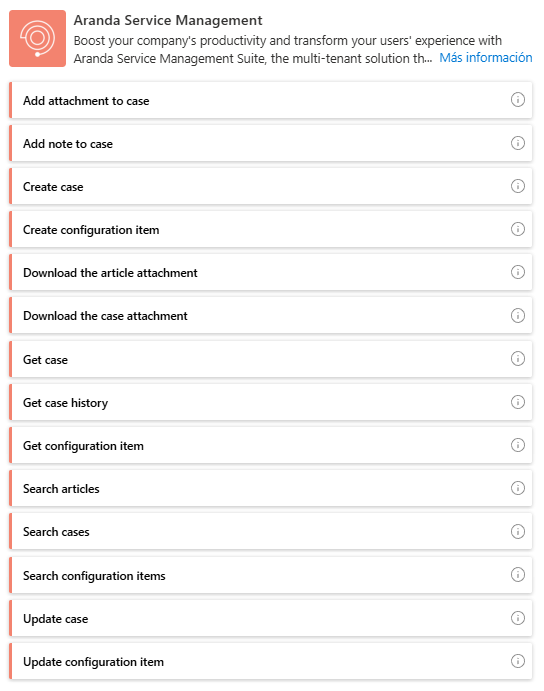
| Function | Description |
|---|---|
| Add attachment to the case: | Attach a file to a specific case record in ASMS. |
| Add note to the case: | Add a note to a specific case record in ASMS. |
| Create Case: | Create a new case record in ASMS. |
| Create Case (V2): | Create a new case record in ASMS (additional fields are added dynamically). |
| Create Configuration Item: | Create a new record of a configuration item in the Aranda CMDB. |
| Create Configuration Item (V2): | Create a new record of a configuration item in the Aranda CMDB (additional fields are added dynamically). |
| Download article file: | Download attachment related to the article. |
| Download case file: | Download attachment related to the case. |
| Get Case: | You get a record of a case in ASMS. |
| Get Case History: | You get the traceability of a case in ASMS. |
| Get Configuration Item: | Gets a record of a configuration item in the Aranda CMDB. |
| Add attachment to the case: | Attach a file to a specific case record. |
| Add note to the case: | Adds a note to a specific case record. |
| Create Case: | Create a case record. |
| Create Configuration Item: | Creates a new record for a configuration item. |
| Create Task: | Creates a task record associated with a case. |
| Download the article attachment: | Download attachment associated with the article. |
| Download case attachment: | Download attachment associated with the case. |
| Get Case: | Gets the details of a case record. |
| Get Case History: | Obtain the traceability of a case. |
| Get Configuration Item: | Gets the details of a record for a configuration item. |
| Get Task: | Gets the details of a task record. |
| Search for articles: | Retrieves a list of articles based on the search criteria added in the query. |
| Search for cases: | Retrieves a list of cases based on the search criteria added in the query. |
| Search for configuration items: | Retrieves a list of configuration items based on the search criteria added in the query. |
| Update case: | Updates a record for an ASMS case. |
| Update Case (V2): | Updates a record for an ASMS case (additional fields are added dynamically). |
| Update Configuration Item: | Updates a record for a configuration item in the Aranda CMDB. |
| Update Configuration Item (V2): | Updates a record for a configuration item in the Aranda CMDB (additional fields are added dynamically). |
| Search for tasks: | Retrieves a list of tasks based on the search criteria added in the query. |
| Update case: | Updates a record for a case. |
| Update Configuration Item: | Updates a record for a configuration item. |
| Update Task: | Updates a record for a task. |