


Inactivity and logout
To optimize resources and maintain proper conversation management, the bot automatically handles session inactivity. This inactivity and shutdown control applies only to the following actions: create case, view case, view article, install software, and add comments.
Prior Warning of Inactivity
If the user leaves the request in progress without interaction and does not complete it, after 5 minutes of inactivity the following alert is sent:
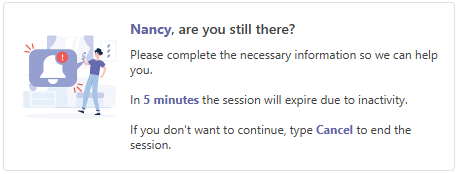
Behavior during the alert:
- If the user responds, the idle time is restarted and the flow continues normally.
- If the user does not respond, the session is logged out when the configured maximum time is reached.
- If the user types “Cancel”, the session ends immediately and the corresponding closure message is sent.
Automatic shutdown due to inactivity
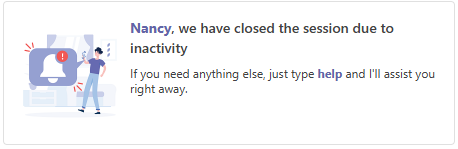
If the user does not interact with the bot during the maximum configured idle time (10 minutes), the user is automatically logged out.
When the bot closes, the bot sends an information card with the following content:
Reactivation of care
When a session has already been logged out due to inactivity, the user can resume care by typing “help”.
When you do so, the bot starts a new session and presents the welcome card again.