To get the case details using the connector Aranda Service Management Consider the following steps:
1. Get the Task ID (Identifier in the task system).
2. Select the function Get Task
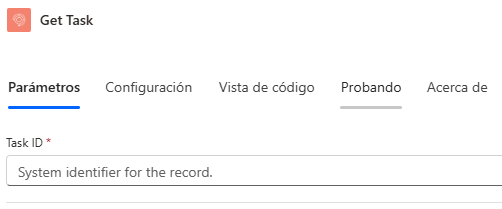
3. Enter the required value:
- Task ID
You will get the following answers:
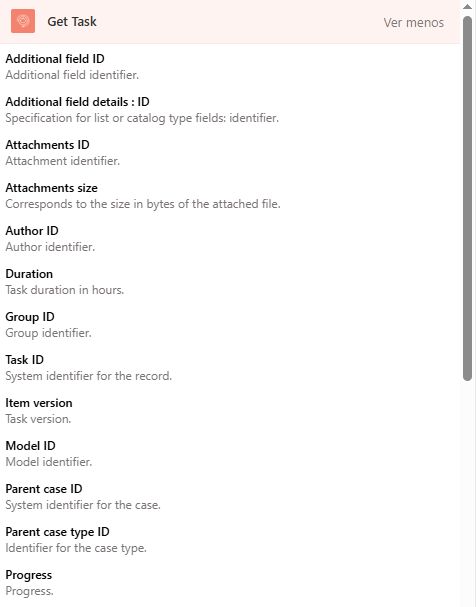
| Name | Identifier | Guy | Description |
|---|---|---|---|
| Additional Fields | additionalFields | Array | Additional task fields, depending on the retrieved case |
| Attachments | attachments | Array | Attachments to the case |
| Author ID | author.id | Integer | Author Identifier |
| Author Name | author.name | String | Author’s Name |
| Solution | commentary | String | Task Solution |
| Description | Description | String | Task Description |
| Duration | Duration | Integer | Task duration in minutes |
| Estimated final date | estimatedDate.final | String | Estimated Final Date |
| Estimated date initial | estimatedDate.initial | String | Estimated Initial Date |
| Final date | finalDate | String | End date |
| Group ID | group.id | Integer | Responsible Group Identifier |
| Group Name | group.name | String | Name of the responsible group |
| Is Priority or Emergency | isPriorityOrEmergency | Boolean | Determine whether the task is a priority or urgent |
| Task ID | Id | Integer | Task System ID |
| Item Type | item.type | String | Task Type |
| Item version | item.version | Integer | Task version |
| Model ID | model.id | Integer | Model identifier |
| Model name | model.name | String | Model Name |
| Creation date | openedDate | String | Task creation date |
| Parent case code | parent.idByProject | String | Project identifier of the main case |
| Parent case id | parent.id | String | System ID for the primary case |
| Parent case type | parent.itemType | String | Case type name for the parent case |
| Parent case type ID | parent.itemTypeId | String | Case type identifier for the parent case |
| Progress | progress | Integer | Progress |
| Project ID | project.id | Integer | Project Identifier |
| Project Name | project.name | String | Project Name |
| Reason ID | reason.id | Integer | Change reason identifier |
| Reason Name | reason.name | String | Change Reason Name |
| Responsible ID | responsible.id | Integer | Identifier of the controller |
| Responsible Name | responsible.name | String | Name of the person in charge |
| Task title | subject | String | Task title |
| Real date final | realDate.final | String | Actual End Date |
| Real date initial | realDate.initial | String | Actual Start Date |
| Status ID | state.id | Integer | State ID |
| Status name | state.name | String | State Name |
| Previous state | state.previousState | String | Previous state identifier |
| Task creation status ID | state.wasCreated | String | Determines the ID of the state with which the task was created |
| Task creation status name | state.wasCreatedName | String | Determines the name of the state with which the task was created |
Additional Fields
For the additional fields, a JSON is presented with the following structure:
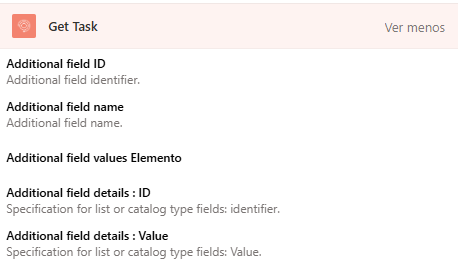
{
    "additionalFields": [
        {
            "fieldId": 0,
            "fieldType": "",
            "nameField": "",
            "values": [
               ""
            ],
            "valueDetails":{
                "id": 0,
                "value": ""
            }
        }
    ]
}
Where:
-fieldId: Id of the additional field.
-fieldType: Additional field type.
-nameField: Name of the additional field.
-Values: Additional field value, the values it returns are similar to those entered when a record is created or updated, this value depends on the type of field, for more information see: Additional fields
-valueDetails: Corresponds to the detail of the list or catalog type fields:
- Id: Corresponds to the system ID for the catalog value.
- value: Corresponds to the name or label of the catalog value.
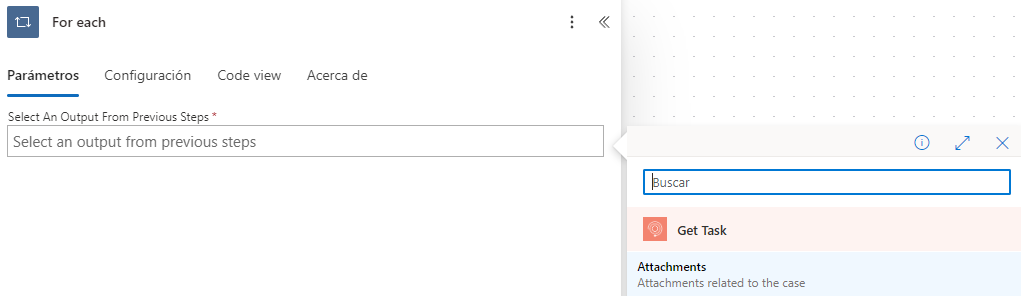
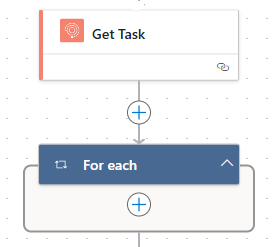
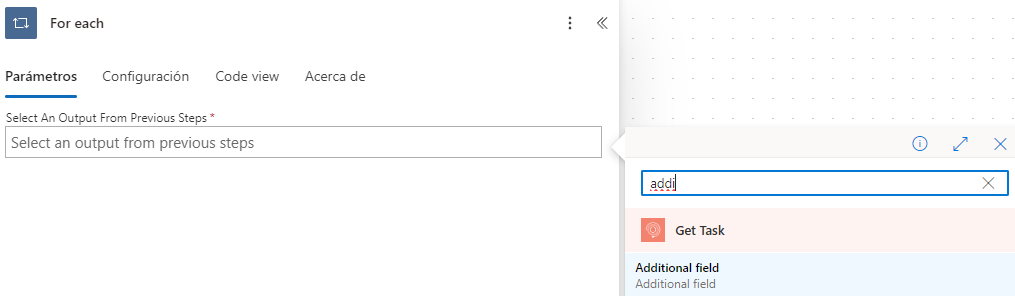
To operate the connector you can make use of the properties shown below:
Using the integrated action:
Attachments
For attachments, a JSON is presented with the following structure:
{
    "attachments": [
        {
            "id": 0,
            "name": "",
            "created": "ISO 8601",
            "description": "string",
            "isPublic": true,
            "size": 0
        }
    ]
}
Where:
-Id: Corresponds to the system ID for the attachment.
-name: Corresponds to the name of the attachment.
-Size: Corresponds to the byte size of the attachment.
-isPublic: Determines whether the attachment is public.
-Description: Determines whether the attachment is public.
-created: Corresponds to the date the attachment was created.
To operate the connector you can make use of the properties shown below:
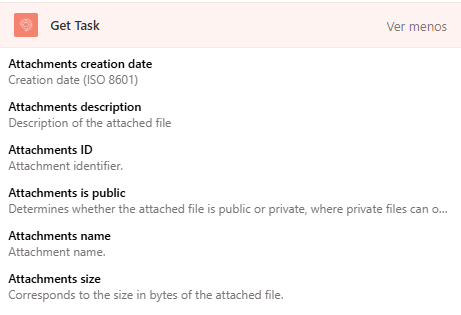
Using the integrated action: