


The management and configuration of the configuration processes for different Aranda applications are carried out from a web environment with shared options and actions.
Commons Environment/ Groups Module
1. In the information view of the common groups module, you can find actions that complement the management tasks.
2. In the tree-like structure for user groups, you can identify the following components:
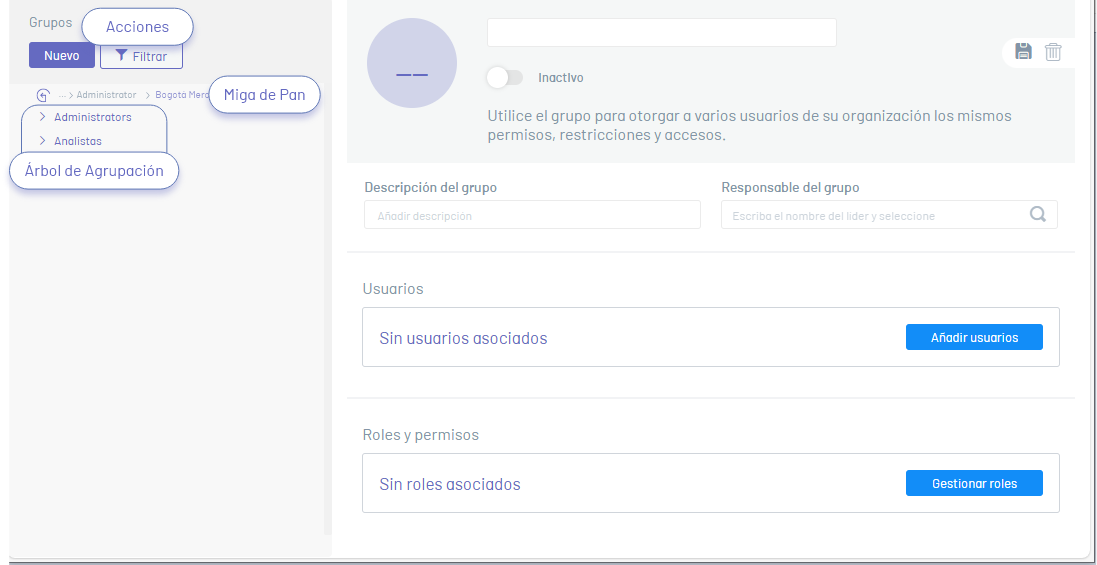
| Option | Description | Common Modules |
|---|---|---|
| New | This button  Defines the action for creating a User Groups record. Activating this action enables a window to fill in the related information. Defines the action for creating a User Groups record. Activating this action enables a window to fill in the related information. |
 |
| Filter | This button  Defines the action to perform an advanced search through the entire group tree. Activating this action enables a window to fill in the related information Defines the action to perform an advanced search through the entire group tree. Activating this action enables a window to fill in the related information |
|
| Grouping tree | This section displays the defined groups and subgroups. | |
| Eliminate | This button  Defines the action to delete an already created group record Defines the action to delete an already created group record |
|
| Breadcrumbs | This icon  Displays the current location in the group tree. Displays the current location in the group tree. |
|
| Add Users | This button  Defines the action for associating users with an established group. Defines the action for associating users with an established group. |
|
| Manage Roles | This button  Defines the action for associating roles with an established group. Defines the action for associating roles with an established group. |
|