


HP TechPulse classifies incidents into types and subtypes.
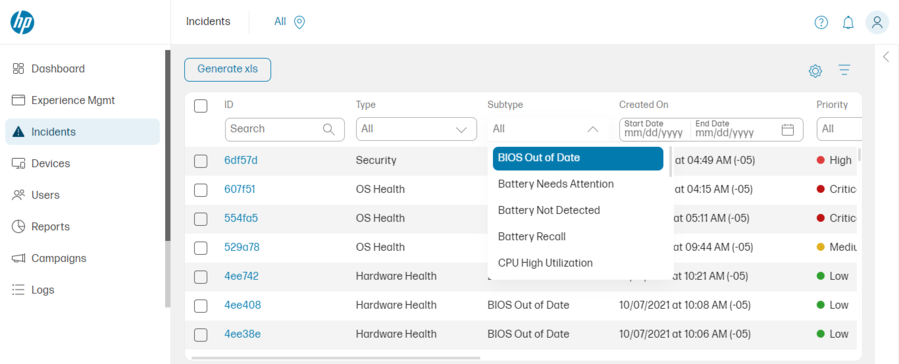
The subtypes are listed below:
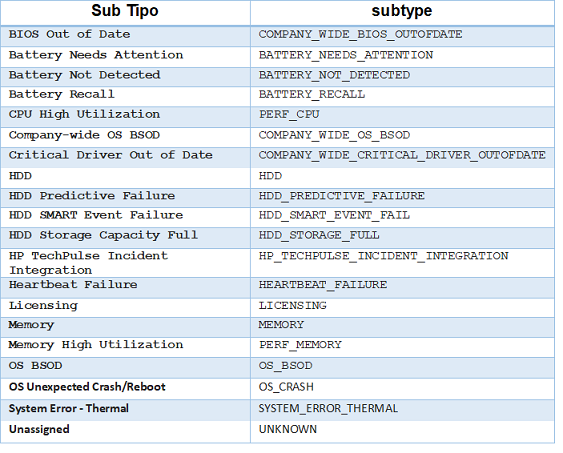
HP TechPulse APIs recognize subtypes as shown in the column “subtypes”, these values will be directly related to the type of incident that will be created in ASMS.
To perform the integration, enter these values as follows:
{
  "mappers": [
    {
      "tenantIds": [
        ""
      ],
      "subtypes": [
        "COMPANY_WIDE_BIOS_OUTOFDATE",
        "BATTERY_NEEDS_ATTENTION",
        "BATTERY_NOT_DETECTED",
        "BATTERY_RECALL",
        "PERF_CPU",
        "COMPANY_WIDE_OS_BSOD",
        "COMPANY_WIDE_CRITICAL_DRIVER_OUTOFDATE",
        "HDD",
        "HDD_PREDICTIVE_FAILURE",
        "HDD_SMART_EVENT_FAIL",
        "HDD_STORAGE_FULL",
        "HP_TECHPULSE_INCIDENT_INTEGRATION",
        "HEARTBEAT_FAILURE",
        "LICENSING",
        "MEMORY",
        "PERF_MEMORY",
        "OS_BSOD",
        "OS_CRASH",
        "SYSTEM_ERROR_THERMAL",
        "UNKNOWN"
      ],
      "filter": "",
      "case": {
        "customer": 0,
        "company": 0,
        "category": 0,
        "ci": 0,
        "itemType": "",
        "project": 0,
        "service": 0,
        "reason": 0,
        "sla": 0,
        "state": [
          {
            "id": 0,
            "value": "",
            "commentary": ""
          }
        ],
        "urgency": [
          {
            "id": 0,
            "value": ""
          }
        ],
        "additionalFields": [
          {
            "fieldId": 0,
            "values": [
              ""
            ]
          }
        ]
      }
    }
  ],
  "tenantIds": [
    ""
  ],
  "companies": [
    {
      "id": 0,
      "tenantId": ""
    }
  ],
  "uniqueTenant": ""
}