


Description
The Device Import functionality allows you to register devices in bulk by uploading a CSV file. This functionality is useful for onboarding devices quickly and efficiently without the need to register them one by one in the system.
Template download and upload
1. To download the import template, enter the menu Inventory > Devices, select the More options, click Records and download the device import template.

2. Fill out the template by filling in the required fields according to the established format; Do not modify the column headers and validate the information before saving the file.
3. To upload the template, go back to Inventory > Devices, select More Options > Files, click Files, select the filled template, and click the Import icon.
4.As a result, the system validates the information contained in the file and creates only the devices that comply with the validations. If some records have errors, the system will display a message with the import summary (for example: out of 10 records, 8 were imported and 2 failed). Fix the failed logs and reload them; It is not necessary to reload those that have already been successfully imported.
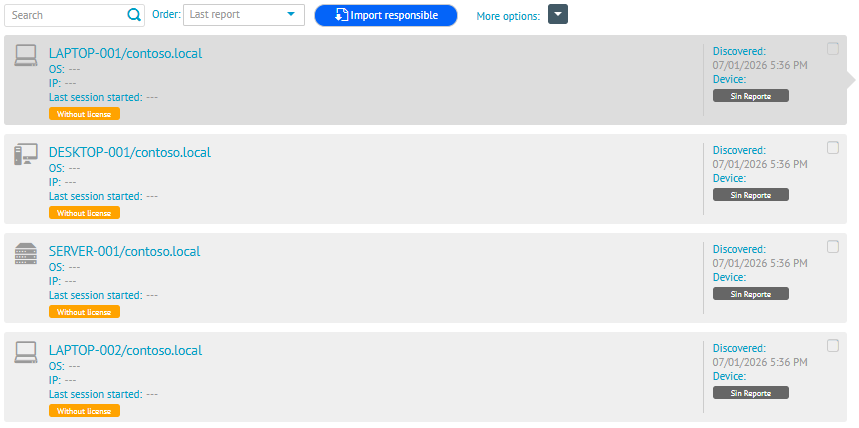
Available fields
| Field | Obligatory | Description |
|---|---|---|
| Name | Yes | Device name. |
| Type | Yes | Device type. Allowed values: Unknown, Desktop, Laptop, Server, Printer, Switch, and Router. |
| Domain | No | Domain associated with the device. |
| Description | No | Additional description of the device. |
| Latitude | No | Latitude of the device’s location. |
| Length | No | Length of the device’s location. |
| Serial | No | Serial number of the device. |
| ProcessorModel | No | Processor model. |
| ProcessorManufacturer | No | Processor manufacturer. |
| ProcessorSpeed | No | Processor speed. |
| ProcessorFamily | No | Processor family. |
| ProcessorFeatures [Separated by |] | No | List of processor characteristics separated by the pipe character (|). |
⚐ Notes: - The structure of the file provided as a template should not be modified.
- The only format allowed for upload is CSV.
- The only required columns are Name and Type. All other columns are optional.
- In the ProcessorFeatures field [Separated by |], only the character | (pipe) as a separator. Commas, semicolons, or other characters are not allowed.
- If an optional field has no information, it can be left empty, but the comma (,) must be retained to properly separate the field in the CSV.
Expected header of the CSV file
Name,Type[Unknown-Desktop-Laptop-Server],Domain,Description,Latitude,Longitude,Serial,ProcessorModel,ProcessorManufacturer,ProcessorSpeed,ProcessorFamily,ProcessorFeatures[Separated by |]
CSV File Example
Name,Type[Unknown-Desktop-Laptop-Server],Domain,Description,Latitude,Longitude,Serial,ProcessorModel,ProcessorManufacturer,ProcessorSpeed,ProcessorFamily,ProcessorFeatures[Separated by |]
DESKTOP-001,Desktop,CORP.LOCAL,Equipo de desarrollo,4.7110,-74.0721,SN123456,Intel Core i7-11700K,Intel,3.6 GHz,11th Generation,SSE|AVX|AVX2
LAPTOP-002,Laptop,CORP.LOCAL,Portátil ejecutivo,4.7110,-74.0721,SN123457,Intel Core i5-11300H,Intel,3.1 GHz,11th Generation,SSE|AVX
SERVIDOR-001,Server,CORP.LOCAL.SERV,Servidor de aplicaciones,4.7110,-74.0721,SN123458,Intel Xeon Gold 6258R,Intel,2.7 GHz,Xeon,SSE|AVX|AVX2|AVX512
DESKTOP-003,Desktop,CORP.LOCAL,,,,Intel Core i3-10100,Intel,3.6 GHz,10th Generation,SSE|AVX