


The silent install command can be configured from the creation of the package or can be configured by selecting the package in the distribution project.
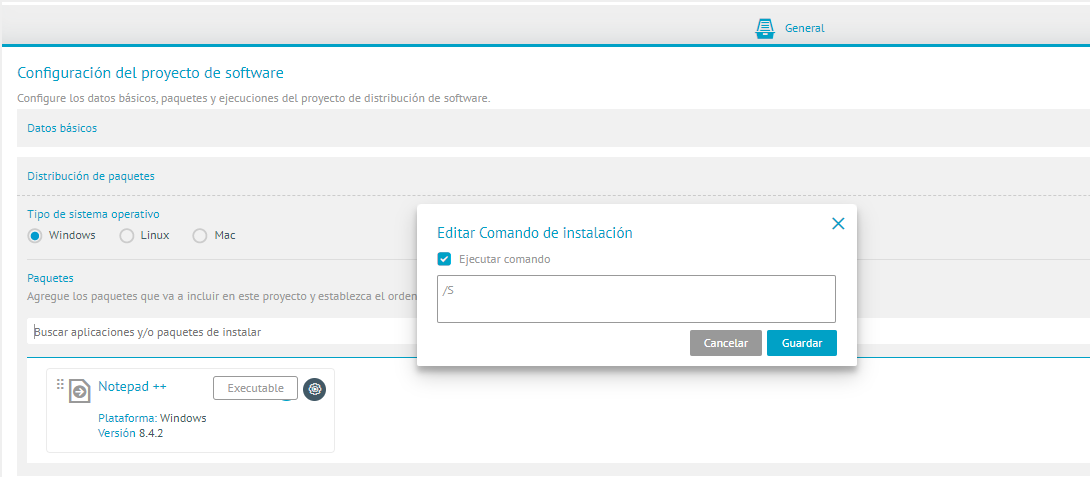
⚐ Note: To validate whether the silent command is appropriate, run the Command Prompt as administrator (cmd) on the local computer the following structure C:\WINDOWS\System32>”(path\nombrePrograma.exe)” /(Silent Command). If you see the installation GUI when you run the command, it is not the right silent command for the program. If the command does not present any information when executed, it means that it is the correct silent command. Note that when the command is invalid, the system does not always immediately display an error. In some cases, novelty may be reflected after about 2 hours, when a timeout is generated during the execution of the distribution project.

⚐ Note: The following commands can prompt user interaction and block the agent from running. Avoid using them in stealth installation scripts:
| Command | Reason |
|---|---|
PAUSE |
Wait for “Press any key to continue…”. |
SET /P var=Texto |
Prompts the user to enter a value. |
CHOICE |
Displays options and waits for a selection (Y/W or List). |
COPY CON archivo.txt |
Interactive input from keyboard to Ctrl+Z. |
MORE |
Paginator that requires interaction to advance page or line. |
XCOPY |
You can ask for confirmation if you don’t use options to suppress prompts. |
MOVE / DEL / RD |
They may ask for confirmation in certain cases (e.g. with /P or depending on patterns/attributes). |
REN / RENAME |
In cases of collision or ambiguity it may require confirmation depending on the context. |
START |
You can open a new window and appear interactive if the started process requests input. |
CALL to another .bat |
It is not interactive by itself, but inherits the interaction of the called script. |
Command for PowerShell Packages (.PS1)
For type packages Execution with extension .PS1, the agent executes the script with the following structure, where the Installation command line configured in the package is sent as the script parameters:
powershell.exe -Noprofile -NonInteractive -ExecutionPolicy Bypass -File "<ruta del script>" <parámetros configurados en el paquete>
⚐ Note: The following cmdlets can request user interaction and block the agent from running. Avoid using them in stealth installation scripts:
| Cmdlet | Reason |
|---|---|
Read-Host |
Prompts the user to enter a value. |
Pause |
Wait for “Press any key to continue…”. |
Get-Credential |
Opens a box to request credentials. |
$Host.UI.PromptForChoice |
Displays options and waits for a selection. |
Out-GridView (without -PassThru -Wait script-driven) |
Opens an interactive window and can block execution until closed. |
Remove-Item / Stop-Process however, -Confirm:$false |
You can request confirmation depending on the execution policy or context. |
Start-Process however, -Wait Nor window management |
You can open a new window and appear interactive if the started process requests input. |