


In the previous section, the relationship between AFLS and ServiceNow properties was created
| AFLS Ownership | Ownership in ServiceNow | Type of mapping |
|---|---|---|
| subject | short_description | FieldValue |
| Description | Description | FieldValue |
| service | N/A | NotMapped |
| priority | priority | Mapper |
| client | Caller | FieldValue |
| Company | Company | FieldValue |
| state | state | – |
| Location | Location | FieldValue |
| Note | work_notes | FieldValue |
The configuration file allows you to create a relationship between ServiceNow and AFLS values, it also allows you to assign values statically.
The properties used to create the relationship of the values are as follows:
{
    "workOrder": [ ],
    "model": [ ],
    "client": [
        {
            "value": "",
            "reference": "",
            "id": 0
        }
    ],
    "company": [
        {
            "reference": "",
            "value": "",
            "id": 0
        }
    ],
    "priority": [
        {
            "reference": "",
            "value": "",
            "id": 0
        }
    ],
    "service": [
        {
            "reference": "",
            "value": "",
            "id": 0
        }
    ]
}
The properties that will be taken into account for the comparison of values are the following:
| AFLS Ownership | Ownership in ServiceNow | Type of mapping |
|---|---|---|
| priority | priority | Mapper |
1. Search ServiceNow for the values for the properties listed above:
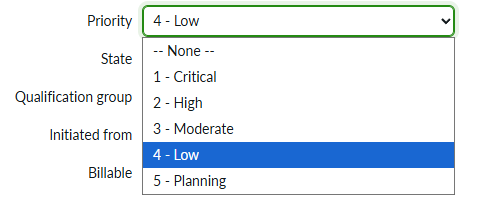
2. With the help of a Aranda Field Service (AFLS) Get the IDs of the values for the property Order Type.
3. Match the values of Channel of ServiceNow with the ID of the property Record Type of AFLS, as shown below:
| Types of Work Orders in AFLS | AFLS Order Type ID |
|---|---|
| Normal, | 0 |
| Emergency, | 1 |
| Priority, | 2 |
| Priority ServiceNow | ID Priority ServiceNow AFLS |
|---|---|
| 3 - Moderate | 3 |
| 2 - High | 2 |
| 1 - Critical | 1 |
| Priority ServiceNow | AFLS Case Type |
|---|---|
| 3 | 0 |
| 2 | 1 |
| 1 | 2 |
4. Type the values in the “priority” from the configuration file:
{
  "priority": [
    {
      "value": "3",
      "reference": "",
      "id": 0
    },
    {
      "value": "2",
      "reference": "",
      "id": 1
    },
    {
      "value": "1",
      "reference": "",
      "id": 2
    }
  ]
}
The property “reference”, is set as a unique value to relate the properties of the configuration file, in the previous point we set its value to “orden_1”.
9. Enter the reference property:
{
  "priority": [
    {
      "value": "3",
      "reference": "orden_1",
      "id": 0
    },
    {
      "value": "2",
      "reference": "orden_1",
      "id": 1
    },
    {
      "value": "1",
      "reference": "orden_1",
      "id": 2
    }
  ]
}
Continue: Register the “model” property (step 5) ↪