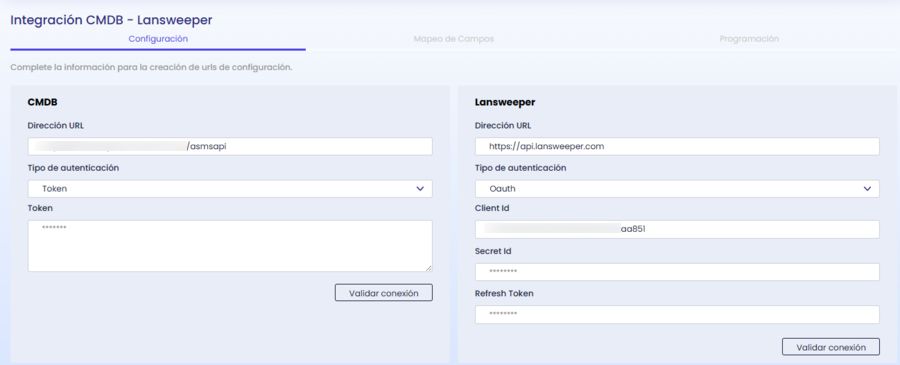
The integration allows you to synchronize assets from Lansweeper towards CMDB from the Aranda Integrations Console (AIC).
The goal is to import relevant asset information, apply configurable mapping rules, and keep CI classification aligned with the customer-defined structure.
Functional scope
The integration considers the following criteria:
- Asset Consultation in Lansweeper.
- Obtaining the detail of the asset to expand the available information.
- Reading custom fields and their associated metadata.
- Mapping of base and additional camps to CMDB.
- Catalog resolution for attributes such as make and model when applicable.
General flow
- Configure CMDB and Lansweeper credentials in AIC.
- Define the configuration file by customer.
- Check out the assets available in Lansweeper.
- Get the detail of each asset.
- Transform and map the information to the CMDB model.
- Register or update CIs in CMDB.
Recommended path for first deployment
If this is your first time setting up the integration, use this order:
- Please complete the Authentication.
- Continue with Configuration File to understand the structure.
- Review Register properties to complete each block.
- Finish in Example to build the final JSON step by step.
Expected Result
The integration makes asset information from Lansweeper available in CMDB, with classification control, mapping, and custom field support.
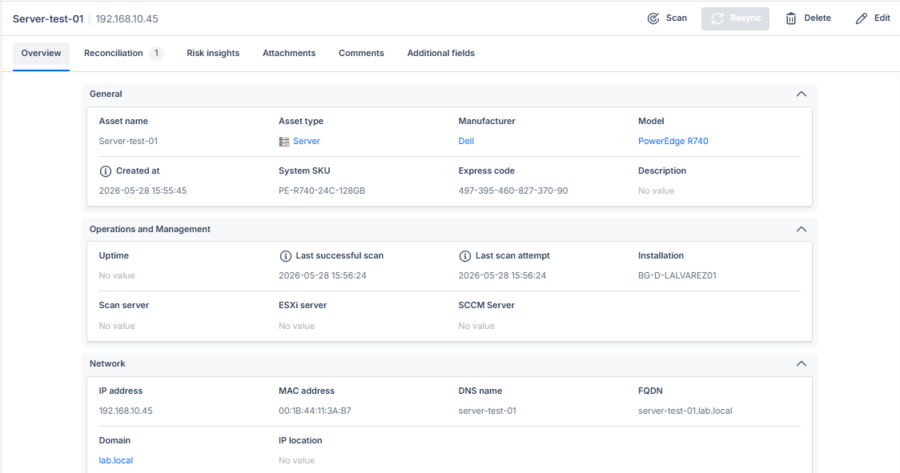
asset in Lansweeper