


The property “workOrder” is a list that allows you to relate AFLS fields to ServiceNow fields:
The relationship of the work order fields in AFLS and ServiceNow is presented using the following JSON (Configuration File):
{
    "workOrder": [
        {
            "table": "",
            "reference": "",
            "dataSource": "",
            "definition": {
                "note": {
                    "type": "",
                    "key": ""
                },
                "subject": {
                    "type": "",
                    "key": ""
                },
                "description": {
                    "type": "",
                    "key": ""
                },
                "service": {
                    "type": "",
                    "searchBy": "",
                    "key": "",
                    "defaultValue": {
                        "id": 0,
                        "value": ""
                    },
                    "onError": [
                        {
                            "action": "",
                            "message": "'{0}'"
                        }
                    ]
                },
                "priority": {
                    "type": "",
                    "defaultValue": {
                        "id": 0,
                        "value": ""
                    },
                    "onError": [
                        {
                            "action": "",
                            "message": ""
                        }
                    ],
                    "key": ""
                },
                "client": {
                    "type": "",
                    "searchBy": "",
                    "searchAfls": "Email,Name",
                    "defaultValue": {
                        "id": 0,
                        "value": ""
                    },
                    "onError": [
                        {
                            "action": "",
                            "message": ""
                        }
                    ],
                    "key": ""
                },
                "company": {
                    "type": "",
                    "searchBy": "",
                    "defaultValue": {
                        "id": 0,
                        "value": ""
                    },
                    "onError": [
                        {
                            "action": "",
                            "message": ""
                        }
                    ],
                    "key": ""
                },
                "location": {
                    "type": "",
                    "key": ""
                }
            }
        }
    ],
    "model": [ ],
    "client": [ ],
    "company": [ ],
    "priority": [ ],
    "service": [ ]
}
In ServiceNow orders are worked on the wm_order, for the example we will take this entity.
1. On the property “table” in the configuration file type the name of the table wm_order.
2. On the property “reference” in the configuration file enter a unique name orden_1, will be used to relate the properties “workOrder” with “model” and “mappings”.
3. The property “dataSource” allows the integration to determine which platform will be the source of information, by default its value is “Both”, leave the default.
{
    "workOrder": [
        {
            "table": "wm_order",
            "reference": "orden_1",
            "definition": {
                "note": {
                },
                "subject": {
                },
                "description": {
                },
                "service": {
                },
                "priority": {
                },
                "client": {
                },
                "company": {
                },
                "location": {
                }
            }
        }
    ]
}
4. Get the name of the ServiceNow properties that you will relate to the AFLS properties by right-clicking on the field name and selecting the option show:
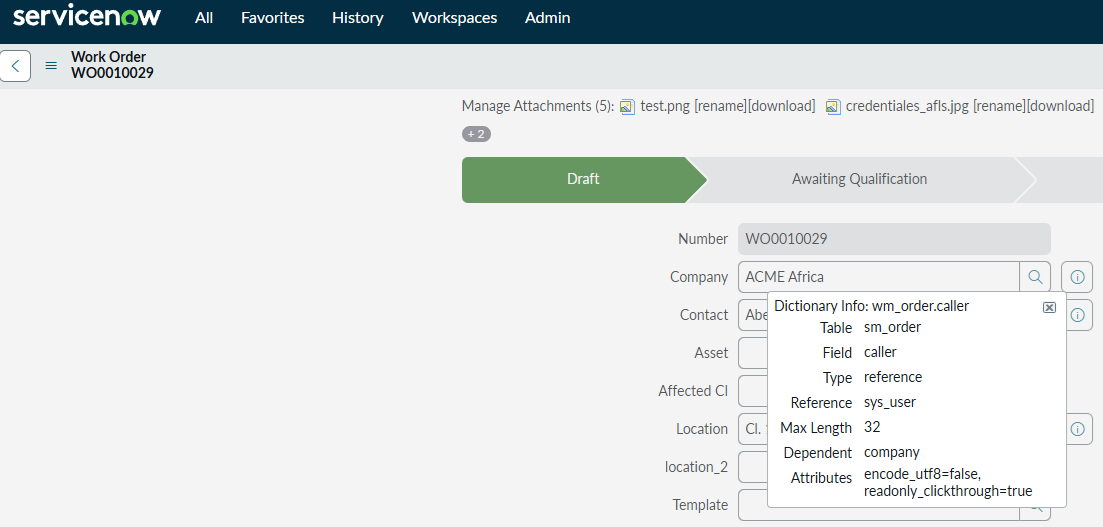
Ownership in ServiceNow
| Label | Name |
|---|---|
| Company | Company |
| Short description | short_description |
| Description | Description |
| State | state |
| Notes | work_notes |
| Priority | priority |
| Location | Location |
| Contact | Caller |
5. Create a relationship between AFLS and ServiceNow properties:
| AFLS Ownership | Ownership in ServiceNow |
|---|---|
| subject | short_description |
| Description | Description |
| service | N/A |
| priority | priority |
| client | Caller |
| Company | Company |
| state | state |
| Location | Location |
| Note | work_notes |
6. Assign the type of mapping that the properties will perform:
| FieldValue: | It takes value directly from ServiceNow; if the field in ServiceNow is of type Reference you must add the value “searchBy” in the configuration file, this field corresponds to the field by which the value will be searched |
| NotMapped | Only available for the field service, allows you to add a default value when you don’t relate a service. |
| Mapper: | Assign this mapping value if you need to compare or relate AFLS and ServiceNow values |
| AFLS Ownership | Ownership in ServiceNow | Type of mapping |
|---|---|---|
| subject | short_description | FieldValue |
| Description | Description | FieldValue |
| service | N/A | NotMapped |
| priority | priority | Mapper |
| client | Caller | FieldValue |
| Company | Company | FieldValue |
| state | state | – |
| Location | Location | FieldValue |
| Note | work_notes | FieldValue |
⚐ Note: Properties that do not have a mapping type will be mapped in later sections.
7. The properties assigned with the “mapping type” “FieldValue”, require ownership “searchBy” in the configuration file, this property allows you to search ServiceNow:
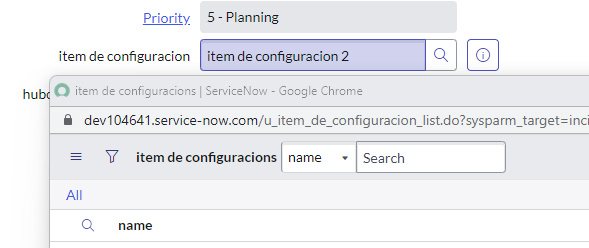
Give the lookup name for the properties type FieldValue:
| AFLS Ownership | Ownership in ServiceNow | Type of mapping | Search field |
|---|---|---|---|
| subject | short_description | FieldValue | – |
| Description | Description | FieldValue | – |
| service | N/A | NotMapped | – |
| priority | priority | Mapper | – |
| client | Caller | FieldValue | |
| Company | Company | FieldValue | Name |
| state | state | – | – |
| Location | Location | FieldValue | – |
| Note | work_notes | FieldValue | – |
⚐ Note: Properties such as “note”, “subject” and “description” do not require ownership “searchBy” because they are not Reference fields in ServiceNow, unlike properties “client” and “company” that if they require the property “searchBy” because they are Reference type fields in ServiceNow.” The property “location” does not require ownership “searchBy” because internally it is searched by latitude and longitude in the table “cmn_location”.
8. Type the relationship made in the previous steps in the configuration file:
{
    "workOrder": [
        {
            "table": "wm_order",
            "reference": "orden_1",
            "definition": {
                "note": {
                    "key": "work_notes",
                    "type": "FieldValue"
                },
                "subject": {
                    "type": "FieldValue",
                    "key": "short_description"
                },
                "description": {
                    "type": "FieldValue",
                    "key": "description"
                },
                "service": {
                    "type": "NotMapped",
                    "defaultValue": {
                        "id": 1
                    }
                },
                "priority": {
                    "type": "Mapper",
                    "key": "priority"
                },
                "client": {
                    "type": "FieldValue",
                    "searchBy": "email",
                    "searchAfls": "",
                    "key": "caller"
                },
                "company": {
                    "type": "FieldValue",
                    "searchBy": "name",
                    "key": "company"
                },
                "location": {
                    "type": "FieldValue",
                    "key": "location"
                }
            }
        }
    ]
}
9. The property “client” Requires ownership “searchAfls” This property determines whether you were to send the Customer Name or Email to search ServiceNow, enter the value “Email” In the configuration file:
{
    "workOrder": [
        {
            "table": "wm_order",
            "reference": "orden_1",
            "definition": {
                "client": {
                    "type": "FieldValue",
                    "searchBy": "email",
                    "searchAfls": "Email",
                    "key": "caller"
                }
            }
        }
    ]
}
⚐ Note: Note that in ServiceNow the Caller is a field of type reference to the users module, so the property must be used “searchBy” To specify the field by which the search will be performed, in this case we assign the “email”.
10. Type in the configuration file the name of the field to which you will relate the property “idByProject”:
{
    "workOrder": [
        {
            "table": "wm_order",
            "reference": "orden_1",
            "definition": {
                "note": {
                    "key": "work_notes",
                    "type": "FieldValue"
                },
                "subject": {
                    "type": "FieldValue",
                    "key": "short_description"
                },
                "description": {
                    "type": "FieldValue",
                    "key": "description"
                },
                "service": {
                    "type": "NotMapped",
                    "defaultValue": {
                        "id": 1
                    }
                },
                "priority": {
                    "type": "Mapper",
                    "key": "priority"
                },
                "client": {
                    "type": "FieldValue",
                    "searchBy": "email",
                    "searchAfls": "Email",
                    "key": "caller"
                },
                "company": {
                    "type": "FieldValue",
                    "searchBy": "name",
                    "key": "company"
                },
                "location": {
                    "type": "FieldValue",
                    "key": "location"
                }
            }
        }
    ]
}