


Relationship between ASMS and DevOps
To perform the integration, it is necessary to relate the fields of the Aranda ASMS task to the fields of the DevOps task through the “task” section of the configuration file.
JSON Structure
{
  "task": [
    {
      "reference": "",
      "definition": {
        "idByProject": {
          "type": "",
          "key": ""
        },
        "subject": {
          "type": "",
          "key": ""
        },
        "description": {
          "type": "",
          "key": ""
        },
        "responsible": {
          "type": "",
          "key": "",
          "SearchBy": [""]
        },
        "responsibleGroup": {
          "key": "",
          "type": "",
          "defaultValue": {
            "id": 0,
            "value": ""
          }
        },
        "duration": {
          "type": "",
          "key": ""
        },
        "enddate": {
          "type": "",
          "key": ""
        },
        "startdate": {
          "type": "",
          "key": ""
        }
      },
      "model": {
        "id": 0,
        "additionalFields": [
          {
            "id": 0,
            "type": "",
            "field": {
              "key": ""
            },
            "mapping": [
              {
                "id": 0,
                "value": ""
              },
              {
                "id": 0,
                "value": ""
              },
              {
                "id": 0,
                "value": ""
              }
            ]
          }
        ],
        "state": [
          {
            "id": 0,
            "value": "",
            "reason": 0,
            "commentary": {
              "key": "",
              "value": ""
            }
          }
        ]
      }
    }
  ]
}
Properties :
| Properties | Description | |
|---|---|---|
| Reference | Unique identifier to create a relationship between cases and tasks | |
| Definition | Allows you to relate ASMS task fields to task fields in DevOps | |
| model | Relationship of additional fields between ASMS and Jira Cloud fields | See |
Definition
To perform the integration, it is necessary to relate the case fields in Aranda ASMS with the DevOps WorkItem through the “definition” section of the configuration file; these properties in ASMS can be associated with list or string fields in DevOps, excluding the subject and description property.
Properties:
| Properties | Description | |
|---|---|---|
| subject | Represents the field Subject of the task in Aranda and allows you to relate this field to an equivalent field of the task in DevOps, it is recommended to use the System.Title. | |
| Description | Represents the field Description of the task in Aranda and allows you to relate this field to an equivalent field of the task in DevOps. | see |
| idByProject | It represents the Task ID and allows you to relate this field to an equivalent field of the task in DevOps. | Internal properties |
| responsibleGroup | Represents the field Responsible Group of the task in Aranda and allows you to relate this field to an equivalent field of the task in DevOps. | Internal properties |
| responsible | Represents the field Responsible of the task in Aranda and allows you to relate this field to an equivalent field of the task in DevOps. | Internal properties |
| Duration | Represents the field Duration of the task in Aranda and allows you to relate this field to an equivalent field of the task in DevOps. | Internal properties |
| End up | Represents the field End date of the task in Aranda and allows you to relate this field to an equivalent field of the task in DevOps. | Internal properties |
| startdate | Represents the field Start Date of the task in Aranda and allows you to relate this field to an equivalent field of the task in DevOps. | Internal properties |
Description:
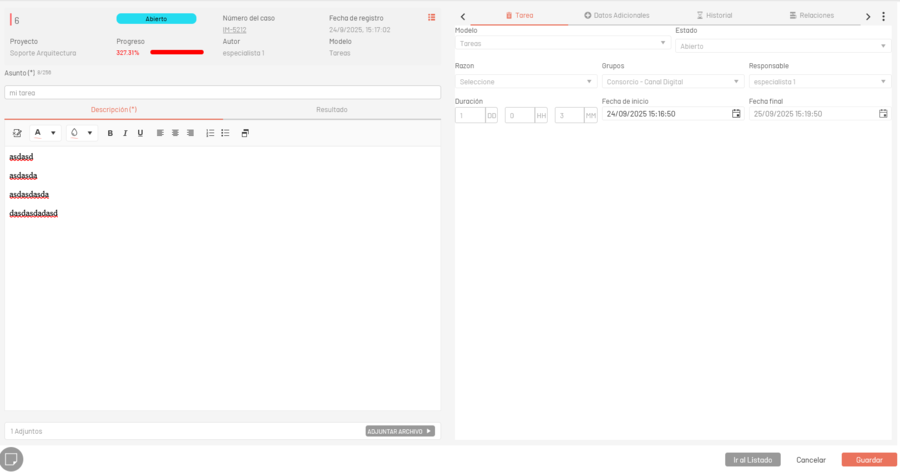
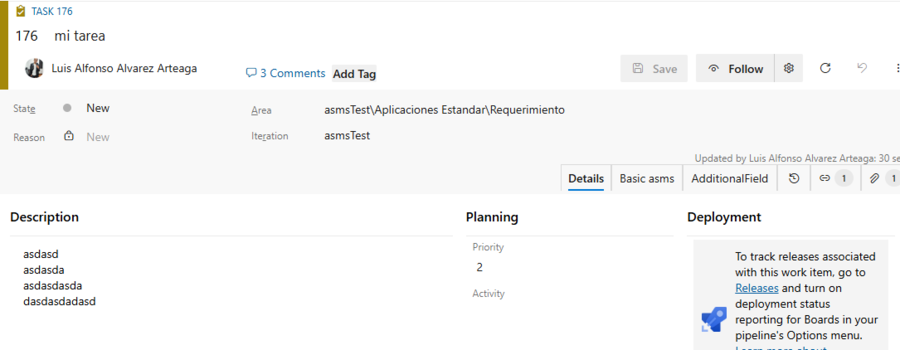
The task description in DevOps can be related to the additional field type “Paragraph” of ASMS tasks.
task in ASMS: Reference illustration, basic task information on the ASMS platform
tarea en DevOps: Ilustración de referencia, información básica de la tarea en la plataforma DevOps
Propiedades internas
{
  "key": "",
  "type": "",
  "searchBy": ["Email"],
  "defaultValue": {
    "id": 0,
    "value": ""
  }
}
Where:
| Properties | Description | |
|---|---|---|
| type | Association type, the supported types are Value, Mapper, FieldValue. | FieldValue, Value, Mapper. |
| Key | Name or identifier of the field in DevOps where the information will be searched and updated. | See |
| searchBy | Field search property, only applies to fields of type “User” (responsible) | See |
| defaultValue | Allows you to add a default value. | See |
“Key” property
Integration allows you to relate task properties to task properties in DevOps
1. To obtain the name of the properties you can consult: DevOps Properties
2. Relate Area Path in DevOps * The naming of the Path Area has the following restrictions: See. * The integration will create the Path Area if it does not exist. * If the value assigned in ASMS is null or empty in DevOps, the default path area that corresponds to the project name is assigned. * If the value assigned in DevOps is the path area, by default (project name) in ASMS the field is assigned empty or null. * If the value assigned in the ASMS OR DevOps property is null or empty and in the configuration file the property is assigned defaultValue, the platforms will have the value registered in defaultValue. * When fields are related to “System.AreaPath” only the relationship types “Mapper” or “FieldValue” are allowed. * To relate the Ids of the properties ASMS with the Area Path, NO type the name that is added by default in the Path Area (project name), add only the Path.
<center><img src="/aic/en/assets/images/devops/areapath_definition.jpg"></center>


* No se permite relacionar más de un campo con la propiedad "System.AreaPath".
* Se relacionan los siguientes tipos de campos adicionales de la tarea con el "Area Path"
    * Short Text
    * List
    * Catalog (List)
    * Catalog (Tree)
* Para los campos adicionales no se permite agregar la propiedad **"value"** si se relaciona con "System.AreaPath".
⚐ Note: Support for additional fields is validated at runtime.
“defaultValue” property
1. The property defaultValue allows you to add default values, if you add this property with the value of defaultValue.id for the case in Aranda or defaultValue.value for the WorkItem in DevOps, the system adds the default value to the platform that set the value.
2. For the fields “subject”, “description”, “idByProject”, you can’t add a default value because they are user-written values, and a value relationship isn’t supported.
3. You can only add a default value if the mapping type is “Mapper” or “FieldValue”.
Example:
1. Set the value “incident” to the Reference.
2. In the definition of Task Take Responsible Property (responsible).
3. “type”: Assign the association type as FieldValue.
4. “key”: Assign the name of the property in DevOps as assigned_to (DevOps Properties).
5. “defaultValue”: Assign the defaultValue.
{
  "task": [
    {
      "reference": "incident",
      "definition": {
        "responsible": {
          "key": "assigned_to",
          "type": "FieldValue",
          "defaultValue": {
             "id": 222,
             "value": "id_usuario_devops"
          }
        }
      }
    }
  ]
}
Search Property
The searchBy property is OPTIONAL, is only valid for the type “FieldValue” and for the responsible field.
This tag allows you to define the property by which the user search will be carried out on the ASMS and DevOps platforms; the supported property is “Email” and by default it will search for the “name” property if the “searchBy” tag is not added.
Use Case
For proper use of the “Email” search property, users of the two platforms must have the same email per user. The following is an example of responsible ownership with the “Email” search option.
{
  "responsible": {
      "type": "FieldValue",
      "key": "assigned_to",
      "searchBy": [ "Email" ]
      }
}
Types of relationship or association of fields
The following association types determine how the values of the ticket properties will be obtained.
| Name | Description | Example |
|---|---|---|
| Value | Allows you to assign a value to the selected field through the configuration file. The value is required to be within the value ratio properties | See example |
| Mapper | Seeks to associate and/or relate the values of the Aranda task with the values of the DevOps task the field indicated in the key property in DevOps, the relationship of values is made 1 to 1, the assignment is not allowed to be repeated | See example |
| FieldValue | Property values are sent directly between platforms without any association/relationship | See example |
⚐ Note: For the fields “subject”, “description”, “idByProject”, only allow the association type: FieldValue
Type example Value
1. Set the value “incident” to the Reference.
2. In the definition of Task Take Responsible Property (responsible) and assign the association type as Value.
{
  "task": [
    {
      "reference": "incident",
      "definition": {
        "responsible": {
          "type": "Value"
        }
      }
    }
  ]
}
3. The relationship implies that a value must be assigned in a common way for all the Tasks, this is achieved by using the “responsible” property, as shown below:
{
  "task": [
    {
      "reference": "incident",
      "definition": {
        "responsible": {
          "type": "Value"
        }
      }
    }
  ],
  "responsible": [
    {
      "reference": "",
      "id": 10
    }
  ]
}
4. Assign a value to the property “responsible.reference”:
{
  "task": [
    {
      "reference": "incident",
      "definition": {
        "responsible": {
          "type": "Value"
        }
      }
    }
  ],
  "responsible": [
    {
      "reference": "incident",
      "id": 10
    }
  ]
}
⚐ Note: The Tasks associated with the “reference” “incident”, in ASMS they will be assigned the person responsible with ID 10.***
Type example Mapper
1. Set the value “incident” to the Reference.
2. In the definition of the Task Take Responsible Property (responsible).
3. “type”: Assign the association type as Mapper.
4. “key”: Assign the name of the property in DevOps as applicant_id_devops (DevOps Properties).
{
  "task": [
    {
      "reference": "incident",
      "definition": {

        "responsible": {
          "type": "Mapper",
          "key": "applicant_id_devops"
        }
      }
    }
  ]
}
5. The relationship implies that you must associate the Aranda desk manager (ASMS) with the DevOps managers, it is recommended to write the Id of the applicant to be related, as shown below:
{
  "task": [
    {
      "reference": "incident",
      "definition": {

        "responsible": {
          "type": "Mapper"
        }
      }
    }
  ],
  "responsible": [
    {
      "reference": "incident",
      "mapping": [
        {
          "id": 5,
          "value": "id_solicitante_devops"
        }
      ]
    }
  ]
}
⚐ Note: The person in charge with Id “5” of the Aranda table (ASMS) is related to the person in charge “id_solicitante_devops” in DevOps***
Type example FieldValue
1. Set the value “incident” to the table.
2. In the definition of the Task Take Responsible Property (responsible).
3. “type”: Assign the association type as FieldValue.
4. “key”: Assign the name of the property in DevOps as applicant_id_devops (DevOps Properties).
{
  "task": [
    {
      "reference": "incident",
      "definition": {
        "responsible": {
          "type": "FieldValue",
          "key": "applicant_id_devops"
        }
      }
    }
  ]
}