


1. To define the integration between AFLS and ASDK, go to the AFLS configuration console, in the Integration from the main menu, select the Service Desk.
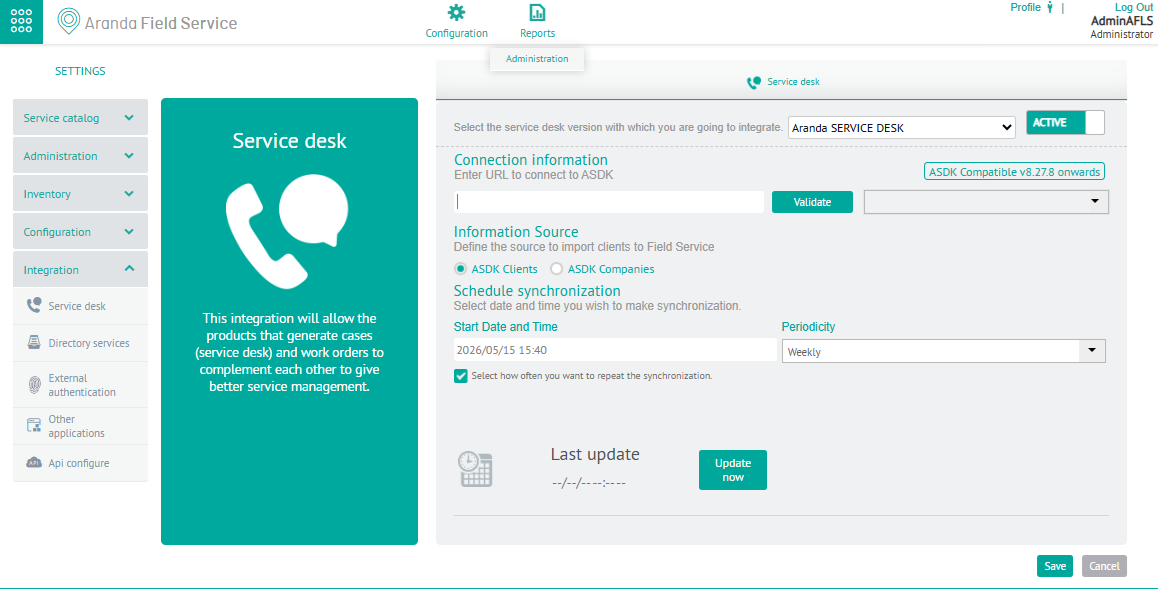
2. In the Detail View, select Aranda Service Desk as the integration type and configure the following parameters taking into account the integration schema:
| Parameters | Description |
|---|---|
| Connection Information: | URL where the integration services exposed by ASDK are hosted. |
| Project: | Projects created in ASDKs, and available to migrate. |
| Source of Information: | It allows you to define the source to import the customers into Aranda FIELD SERVICE. |
| Start Date and Time: | Date and time at which the synchronization process with ASDK data (Companies, customers and dispatchers or specialists) begins. |
| Periodicity: | How often the synchronization is performed depends on this field, if a daily periodicity is chosen, the system will synchronize every day at the scheduled time in the date and start time field. |
| State: | Indicates whether the synchronization process should run or not. |
| Upgrade now: | It is a single execution button, if it is pressed the process will start the next minute. |
2. When you finish setting up the integration, click Save in the Detail View of the AFLS Configuration Console, to confirm the changes made.