


1. In the Aranda FIELD SERVICE web console, in the Configuration from the main menu, select the Global Settings. In the Detail View, turn on the Editing Enabled  and in the detail view fill in the Global Settings information.
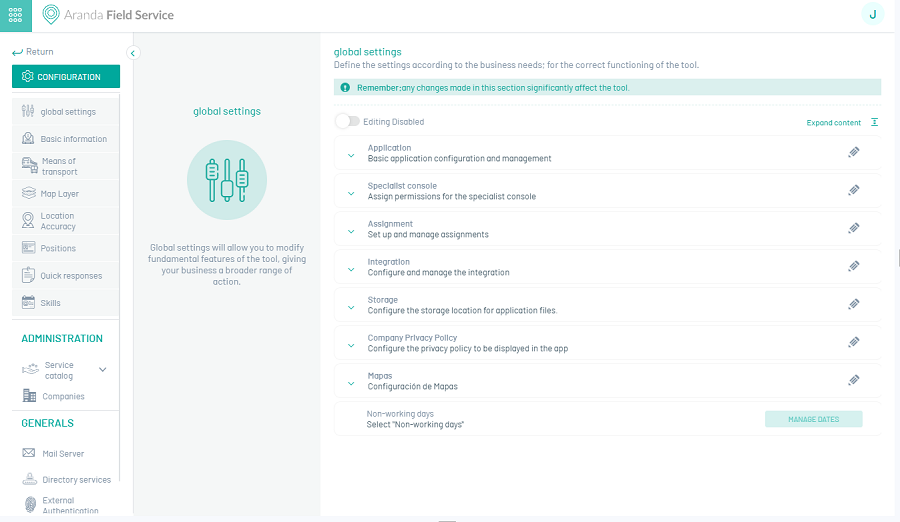
2. When you activate the editing of the Global Settings fields, a confirmation message is displayed to warn about the changes to be made in the tool.
Integration
This parameter complements the integration with the ASDK tool by configuring the AFLS work order execution notification to ASDK field tasks.
3. In the Detail View of Global Configurations, display the Integration and complete the following information:
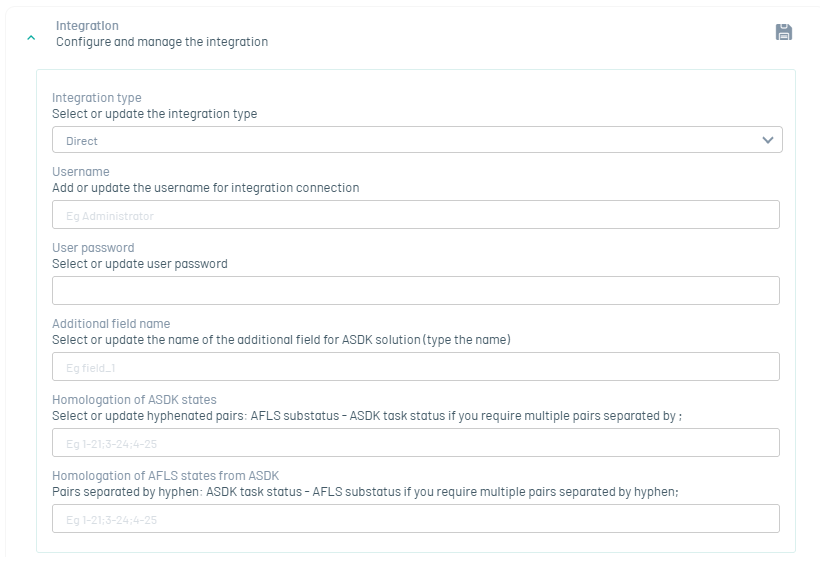
| Fields | Description |
|---|---|
| Type of integration: | A drop-down list is displayed with the direct values (by default it is fed from metadata) or ESB |
| Username | Integration User |
| User Password | Integration User Password |
| Name of the additional field for solution to ASDK | If you are having field feed rule solution of a case in ASDK from an AFLS work order, enter the system name of an additional AFLS field. |
| ASDK Status Approval | This option allows you to make ASDK and AFLS state ID pairs when state changes are to be reported from AFLS to the ASDK. |
| Homologation of AFLS states from ASDK | This option allows you to make state ID pairs of AFLS and ASDKs when state changes are to be reported from ASDKs to AFLS. |
⚐ Note: For newer versions of AFLS and ASDK, we recommend selecting the Direct integration type, which allows AFLS and ASDK to interact directly. To integrate via the WSO2 integration bus, select the ESB option.
2. When you finish configuring the integration options, click Save  to confirm the changes made.